Orange Pumpkin 3D Text Effect: Editable & Eye-Catching Design
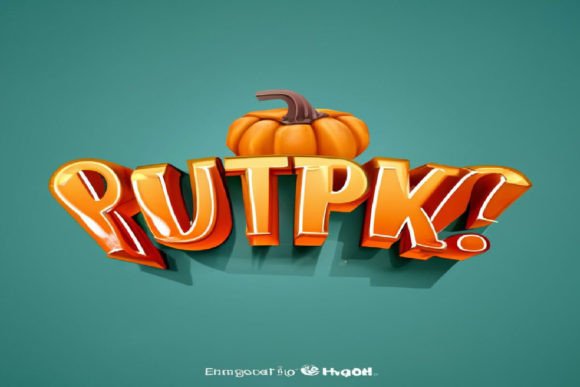
Creating a standout visual doesn't have to be complicated. If you're looking for a design asset that immediately grabs attention and feels polished, the Orange Pumpkin 3D Text Effect Editable is a fantastic resource to explore. This isn't just a font; it's a complete text effect designed to give your typography depth, texture, and a vibrant, seasonal personality that works far beyond autumn.
At its core, this is a layered PSD file that transforms ordinary text into a striking 3D rendering with an orange pumpkin texture. What makes it particularly useful is its editable nature. You don't need to be a Photoshop expert to customize it. Using the Smart Object feature, you can simply double-click the layer, type your own text, and save. The effect automatically applies to your new words, maintaining the professional 3D look and intricate texture. You can also change the background color to match your project's palette, offering great flexibility.
Where This Text Effect Shines
The visual appeal of this effect makes it ideal for a range of creative projects where you need to make an immediate impact. Consider using it for:
- Logo Design & Branding: Perfect for brands with a playful, rustic, or seasonal identity. It can create a memorable wordmark for a farm stand, bakery, or autumn festival.
- Poster & Packaging Design: Instantly elevates event posters, product labels, or menu headers. The 3D depth ensures your text stands out on shelves or in crowded visual spaces.
- Social Media Graphics: Ideal for creating scroll-stopping headers, announcements, or promotional posts. The high-resolution quality ensures it looks sharp on any platform.
- Digital Products & Merchandise: Great for designing unique t-shirt graphics, mug prints, or digital invitations that need a tactile, crafted feel.
Tips for Seamless Integration
To get the most out of this design asset, think about context. While the Orange Pumpkin 3D Text Effect is bold, it's also designed to be versatile. Here’s how to use it effectively:
- Readability First: Use it for headlines, titles, or short phrases where impact is key. Its detailed texture might reduce legibility in very small body text.
- Font Pairing: Pair it with a clean, simple sans-serif or serif font for supporting text. This creates a balanced hierarchy, letting the effect headline without overwhelming the entire design.
- Mood Matching: Its warm, organic texture suits themes of harvest, comfort, creativity, and nature. Align it with similar color palettes and imagery for a cohesive brand identity.
- Check the Details: Always review the included features—like the free font link and license terms—to ensure they fit your project's scope, whether for personal or commercial use.
Choosing the right typographic treatment is a subtle but powerful way to elevate your work. A well-executed effect like this adds a layer of professionalism and intentionality that audiences notice. It transforms simple text into a design element, enhancing visual consistency and making your message more engaging. Whether you're crafting a brand identity, designing a poster, or creating compelling social media content, having a premium, easy-to-edit asset like this in your toolkit saves time and boosts creativity. The Orange Pumpkin 3D Text Effect Editable offers that specific blend of striking visual appeal and practical, user-friendly customization that helps bring your ideas to life with a polished finish.